I am creating a Receipe to connect business central, pulling data from one BC and creating record into another BC.
I have connected to two different environments under connection
I have created a schedule based trigger which will read a table list from one BC connection and loop the list and search into destination table and if not found then create into destination connection.
both side (source & Destination) are Business Central,
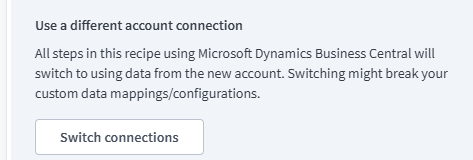
when I connect the destination then it change the source connection as well
so both connections are same (source & destination)
switch connection change to both,
how can we use source & destination different connection into a single recipe?
Thank you
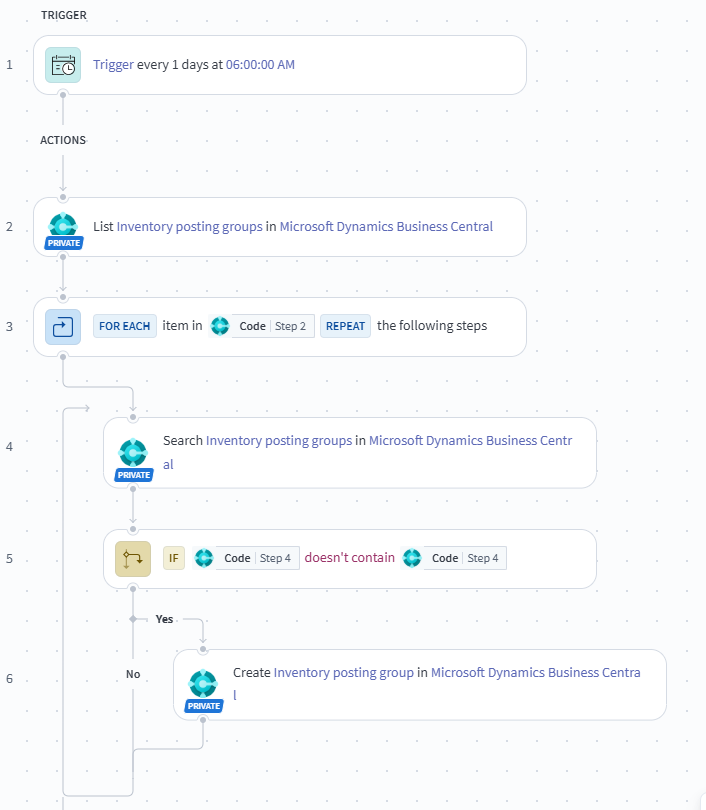

Hi ajayjain, in a single recipe it won’t allow multiple connections for a single recipe, if you want in a single recipe then need to go with SECONDARY Application (but here i guess you are using custom application so may not be SECONDARY app is present), so my suggestion is go with FUNCTION CALL recipe. Parent Recipe (main) has source connection Function call Recipe has destination connection application. the steps 4th, 5th and 6th need to add in function call recipe with required parameter schema. Hope you understand… Thanks…!

yes what Rajesh said, you will need to have two different types of connections. If the app does not have a Secondary option, you may have to switch to using straight HTTP connection and configuring the API calls. Else you will have to use a sub recipe to do the updates. Have one recipe for getting data that sends data to another recipe that updates data
by sub recipe i mean a callable recipe

Hi, You can try using two separate Business Central connections with unique connection names—one for the source environment and another for the destination environment. Make sure both connections are configured independently in Workato, and select the appropriate connection separately for each action in your recipe. This should help you maintain different source and destination environments within a single recipe. Hope this helps!

Hi, you can use a callable recipe, how a workaround. If Business Central does not support secondary connections, split the integration into two recipes. Recipe 1 – Parent recipe: Scheduled trigger; Connect to Source Business Central; Fetch records; Repeat for each record; Call Recipe 2 and pass the required record fields; Recipe 2 – Callable recipe: Trigger: Recipe function – New function call; Connect to Destination Business Central; Search for the record; If it doesn't exist, create it; Return the processing result if required.